NEW Přátelé, chat ve hře a sdílení světůFriends, in-game chat and world sharing

Minecraft launcher,
který hraje s tebou.

The Minecraft launcher
that plays with you.

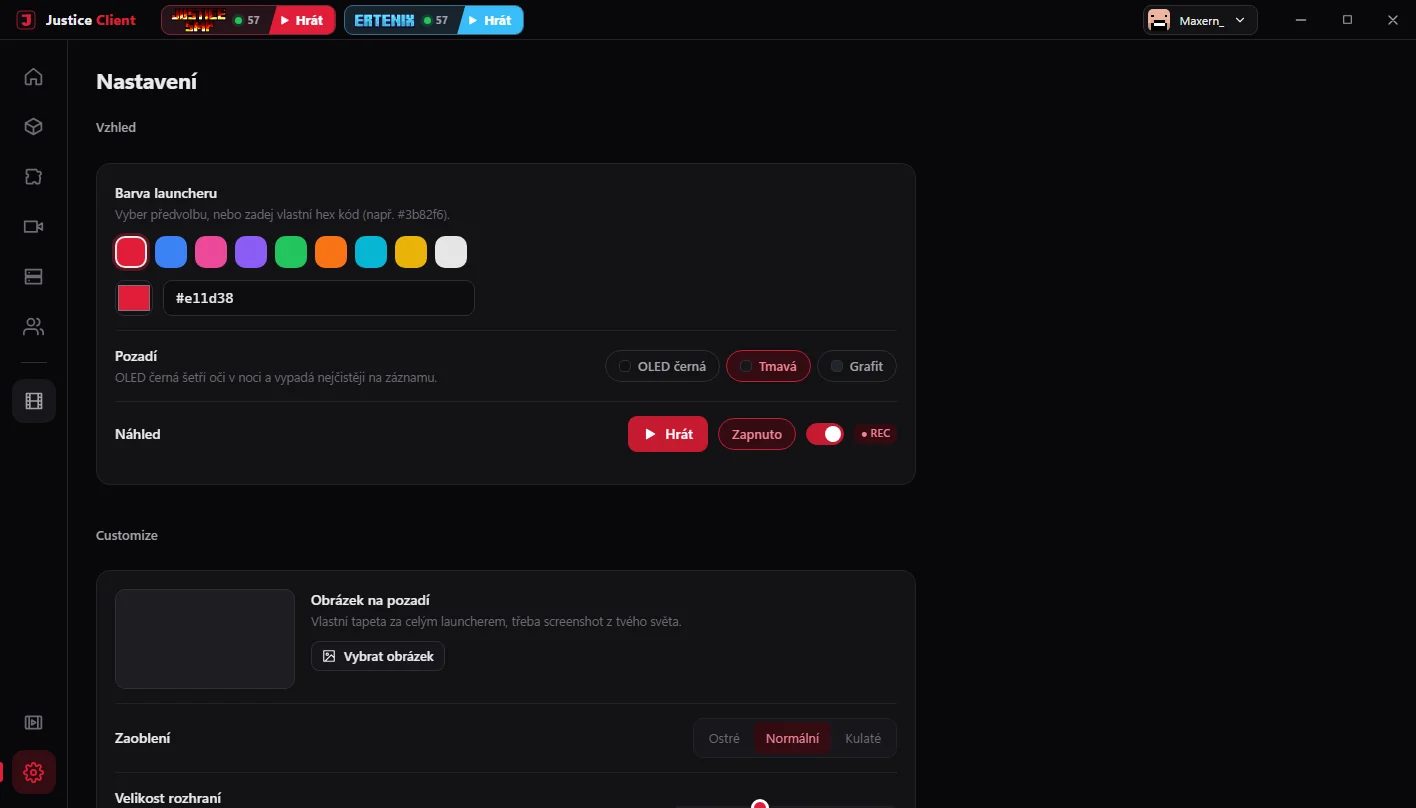
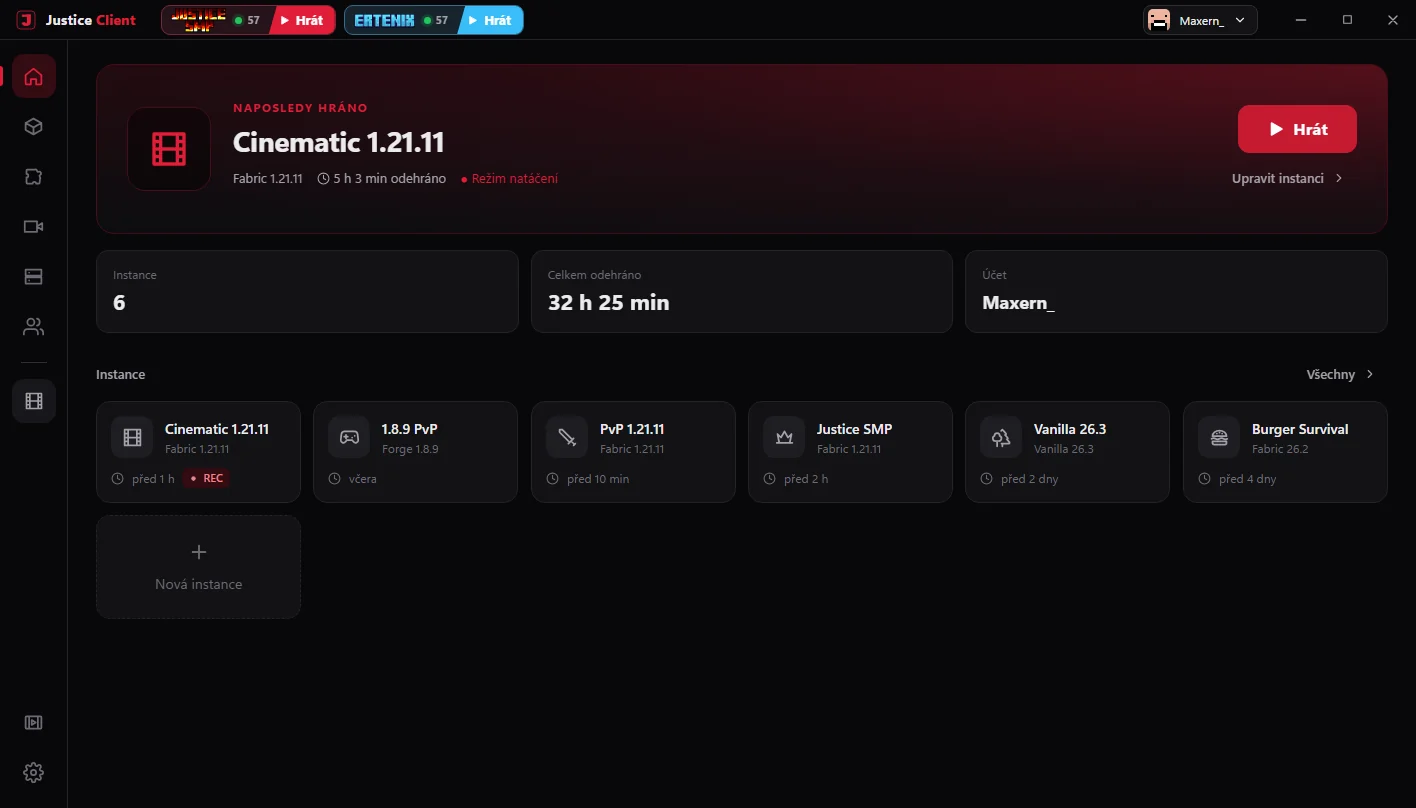
Instance a mody na pár kliků, vlastní menu ve hře, přátelé s chatem, sdílení singleplayer světů a klipy jedním tlačítkem. Zdarma, bez reklam, pro Windows i Linux. Instances and mods in a few clicks, a custom in-game menu, friends with chat, singleplayer world sharing and one-button clips. Free, no ads, for Windows and Linux.

 
Justice Client — domovská obrazovka
5loaderů · Vanilla až NeoForgeloaders · Vanilla to NeoForge
1.8.9 → 26.3verze MinecraftuMinecraft versions
4hotové balíčky modůready-made mod packs
F8a klip je uloženýand the clip is saved
Launcher a instanceLauncher & instances

Každá hra ve vlastní instanci.

Every game in its own instance.

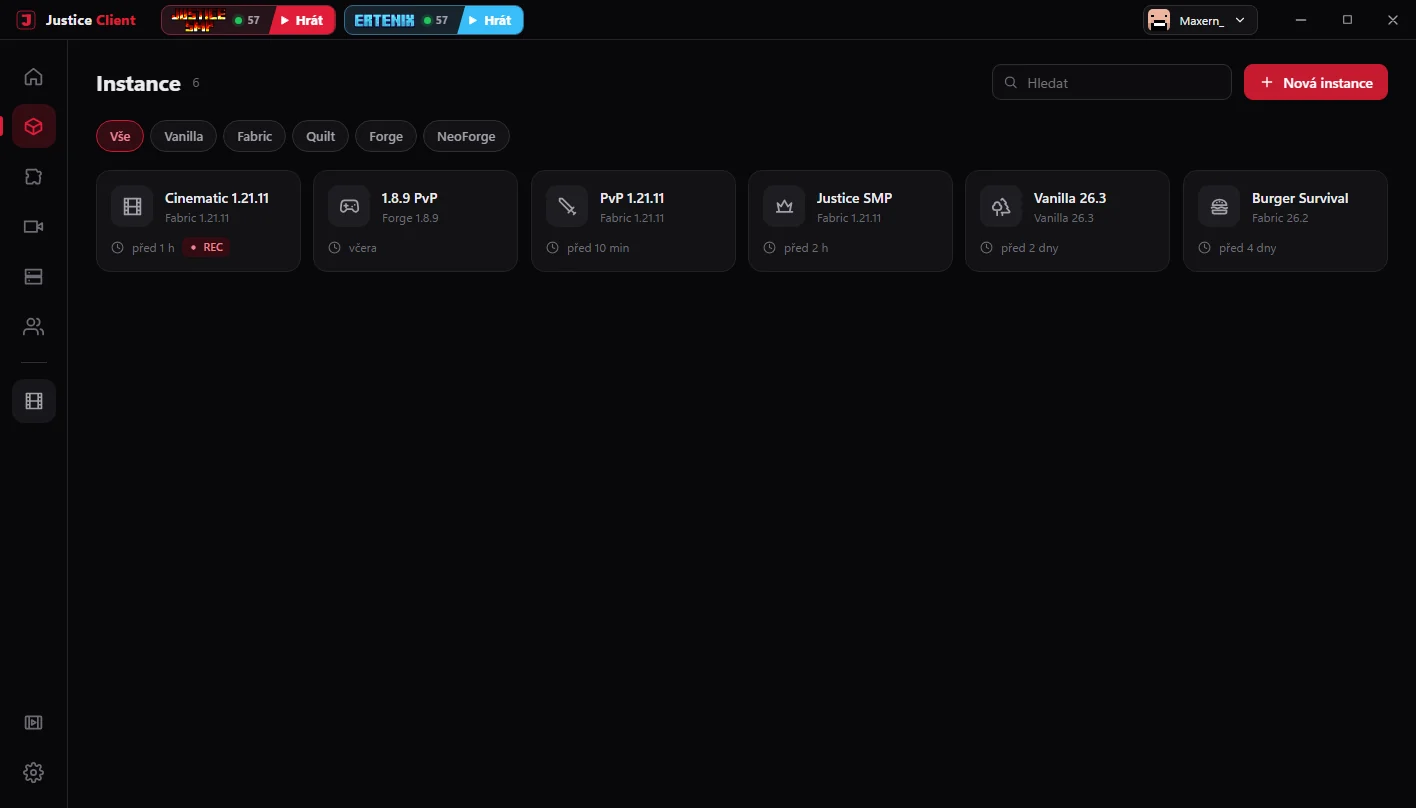
Vanilla, Fabric, Quilt, Forge i NeoForge vedle sebe. Mody, resource packy a shadery se nikdy nepomíchají a mezi verzemi přepneš jedním klikem.

Vanilla, Fabric, Quilt, Forge and NeoForge side by side. Mods, resource packs and shaders never mix, and you switch versions with one click.

  • Modrinth a CurseForge v jednomModrinth and CurseForge in one

    Hledání, závislosti se stáhnou samy, import .mrpack, CurseForge a .dawnpack.

    Search, dependencies download themselves, import .mrpack, CurseForge and .dawnpack.

  • Hotové balíčkyReady-made packs

    Cinematic, SMP, PvP a PvP 1.8.9 — optimalizované, se Simple Voice Chatem.

    Cinematic, SMP, PvP and PvP 1.8.9 — optimised, with Simple Voice Chat.

  • Víc FPS bez práceMore FPS, no effort

    Chytré nastavení RAM a Javy, Sodium, vysoká priorita a analýza pádů.

    Smart RAM and Java settings, Sodium, high priority and crash analysis.

  • Uprav si hoMake it yours

    Barva, obrázek na pozadí, sklo, zaoblení, písmo, pořadí panelu, zkratky i vlastní ikony instancí.

    Colour, background picture, glass, corners, font, sidebar order, shortcuts and custom instance icons.
Režim natáčení

Recording mode

Flashback, čisté nastavení hry pro záběry a OBS, které začne nahrávat samo.

Flashback, clean game settings for footage and OBS that starts recording by itself.

Účty Microsoft

Microsoft accounts

Přihlášení přes Microsoft, víc účtů, skiny a capy s 3D náhledem.

Microsoft sign-in, multiple accounts, skins and capes with a 3D preview.

Samo se aktualizuje

Updates itself

Podepsané aktualizace jedním klikem, zálohy a snapshoty světů.

Signed one-click updates, backups and world snapshots.

Justice Mod

Vlastní menu přímo ve hře.

Your own menu right in the game.

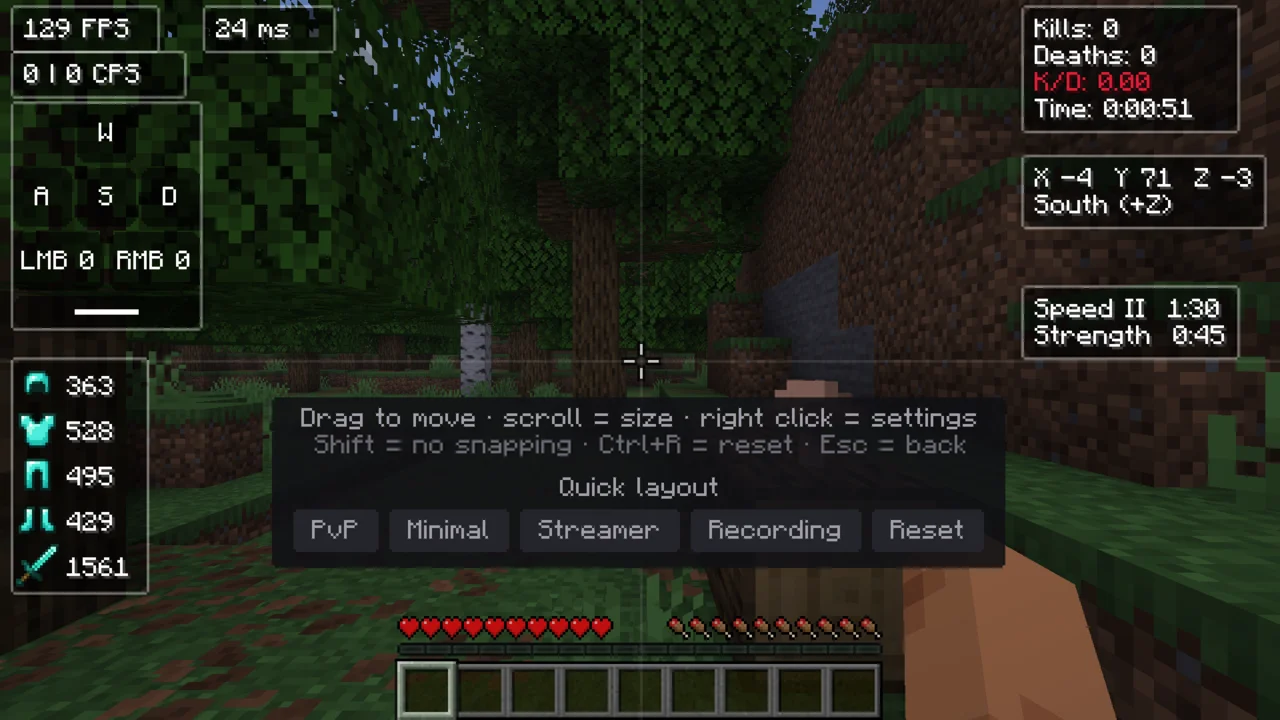
Stiskni Pravý Shift a zapni, co potřebuješ. HUD si rozložíš myší, uložíš jako preset a obarvíš motivem. Launcher ho do Fabric instancí přidá sám — a jedním přepínačem ho zase vypneš.

Press Right Shift and turn on what you need. Drag the HUD around, save it as a preset and colour it with a theme. The launcher adds it to Fabric instances by itself — and one switch turns it off again.
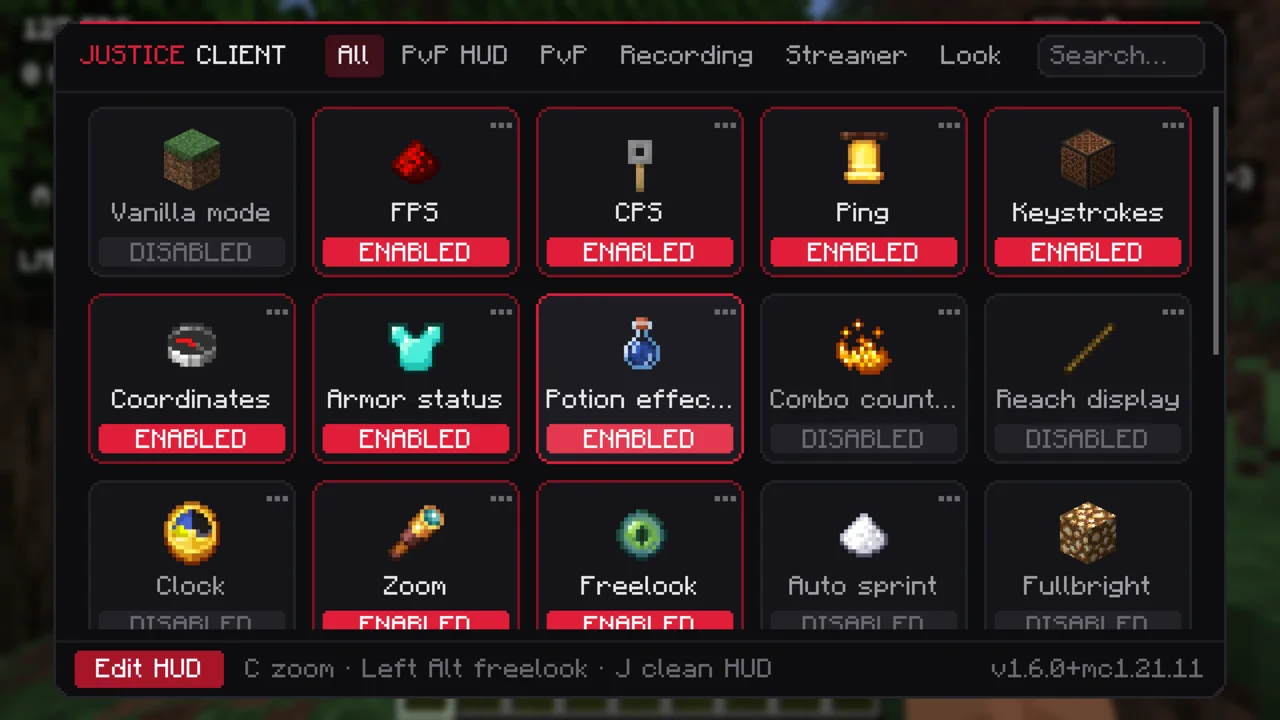
Menu modulůModule menu
Editor HUD a presetyHUD editor & presets
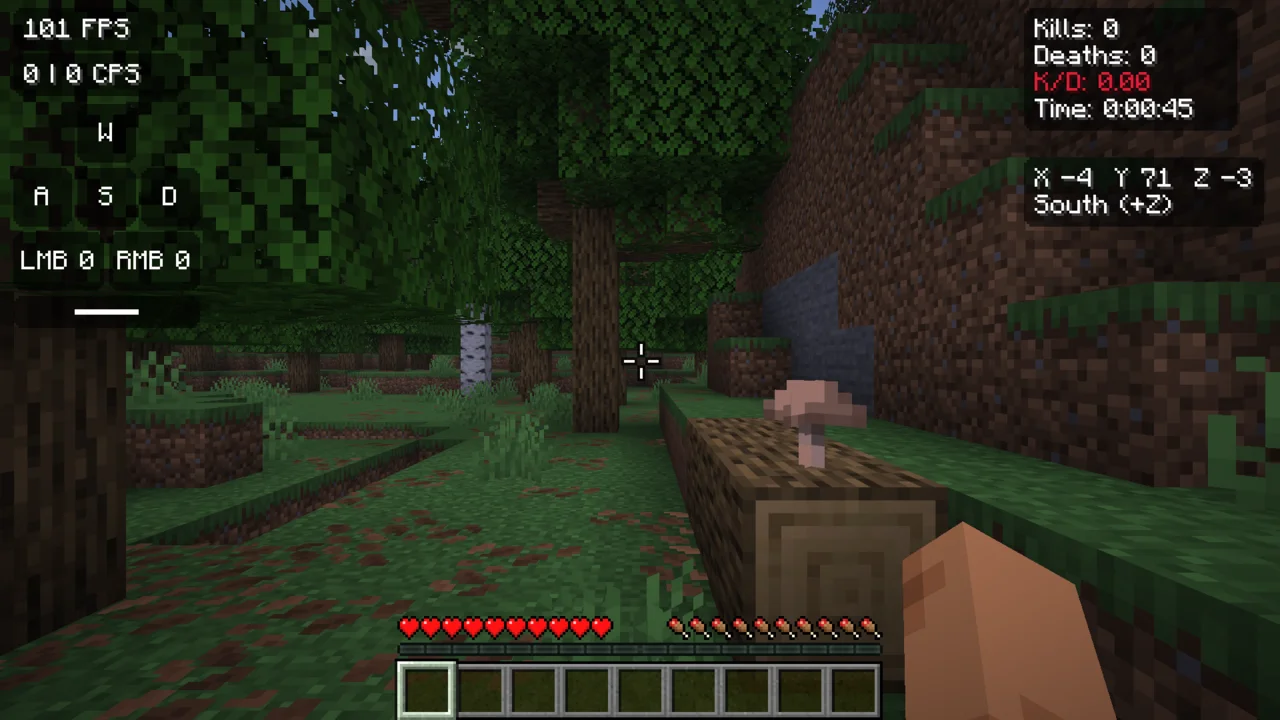
HUD ve hřeIn-game HUD
FPSCPSPingKeystrokes SouřadniceCoordinates BrněníArmor EfektyEffects K/DZoomFreelook ZaměřovačCrosshair Čisté HUDClean HUD Čas a počasíTime & weather MotivyThemes HUD presetyHUD presets Vanilla módVanilla mode Přátelé a chatFriends & chat
Funguje naWorks on 1.21.101.21.1126.126.226.3 · Fabric
Přátelé a sdílení světůFriends & world sharing

Hraj s kámoši bez serveru.

Play with friends, no server needed.

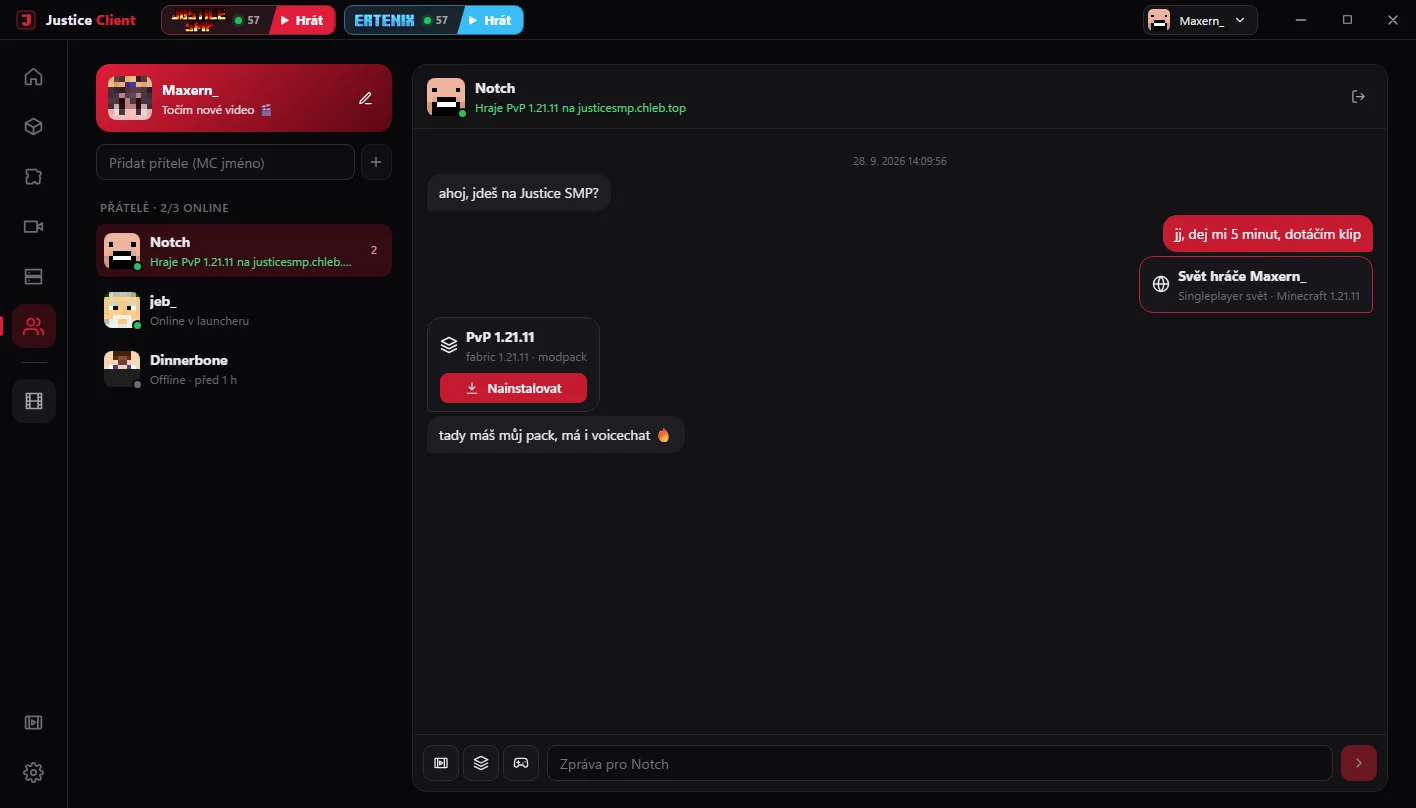
Přidej si kamarády podle Minecraft jména, piš si s nimi v launcheru i ve hře a pozvi je do svého singleplayer světa jedním klikem.

Add friends by their Minecraft name, chat in the launcher and in game, and invite them into your singleplayer world with one click.

  • Chat všudeChat everywhere

    V launcheru, v hlavním menu i ve hře (klávesa U) s upozorněním na nové zprávy.

    In the launcher, on the title screen and in game (U key) with toasts for new messages.

  • Sdílení světů jako EssentialWorld sharing like Essential

    Svět běží u tebe na počítači, kamarádi se připojí přes naši relay — žádné porty ani hosting.

    The world runs on your PC, friends join through our relay — no ports, no hosting.

  • Posílej klipy a modpackySend clips and modpacks

    Modpack se kamarádovi nainstaluje jedním tlačítkem přímo z chatu.

    A modpack installs for your friend with one button right from the chat.

  • Profil, odznaky a achievementyProfile, badges and achievements

    Status, statistiky odehraného času a co zrovna kdo hraje.

    Status, playtime stats and what everyone is playing right now.
TyYouotevřeš světopen your world
Justice relayšifrované WSSencrypted WSS
KamarádFriendklikne Připojitclicks Join
Clips a natáčeníClips & recording

Ten moment už neuteče.

Never miss that moment again.

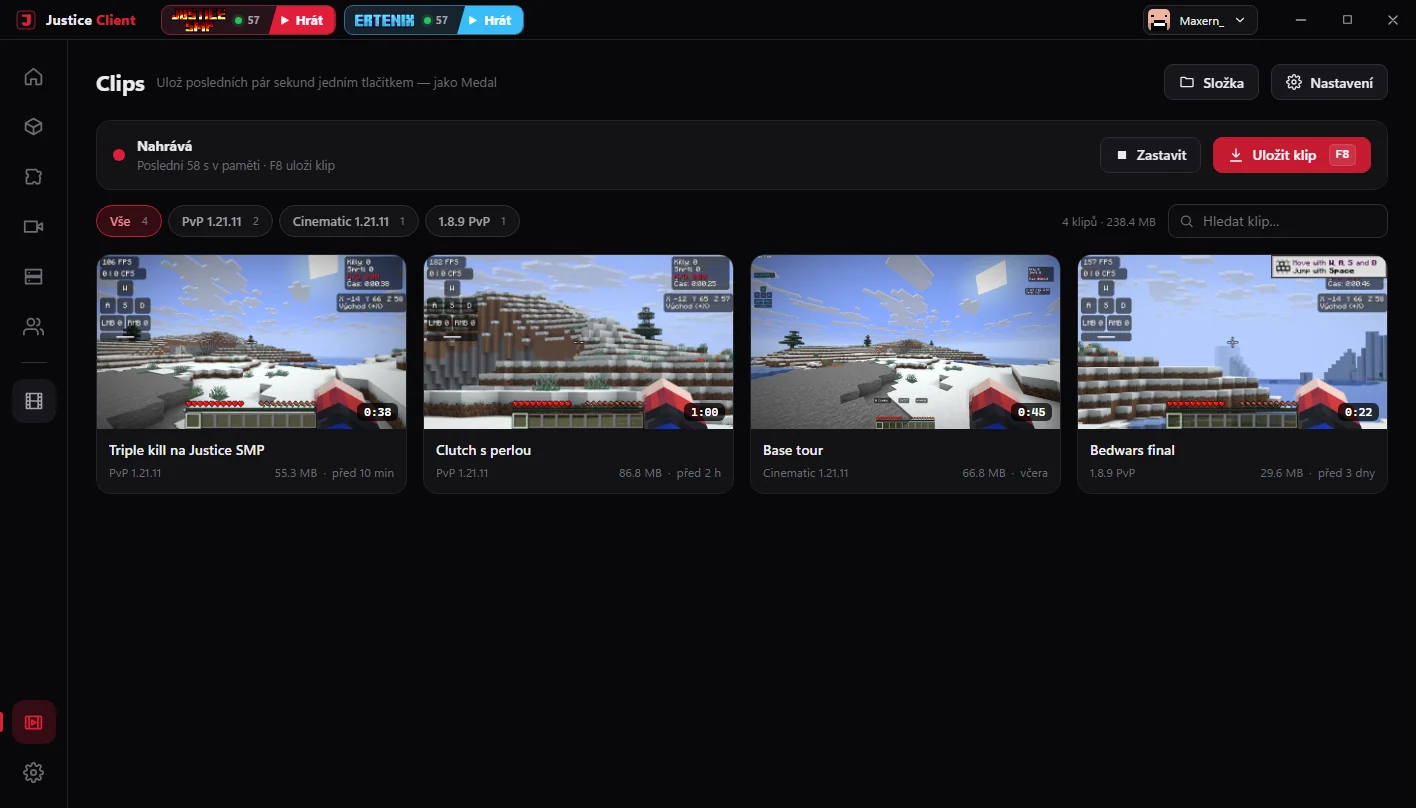
Justice Clips nahrává poslední vteřiny hry do paměti. Když se stane něco epického, zmáčkneš klávesu a klip je na disku — jako Medal, ale přímo v launcheru.

Justice Clips keeps the last seconds of gameplay in memory. When something epic happens, press a key and the clip is on disk — like Medal, but built into the launcher.

F8

Nahrává jen když hraješRecords only while you play
Posledních až 5 minut v 60 FPS, uložené podle hry do složek. Up to the last 5 minutes at 60 FPS, sorted into folders by game.

  • Skoro žádný dopad na FPSAlmost no FPS impact

    Kóduje grafika — na Windows NVIDIA NVENC, na Linuxu gpu-screen-recorder.

    The GPU does the encoding — NVIDIA NVENC on Windows, gpu-screen-recorder on Linux.

  • Zvuk na samostatných stopáchAudio on separate tracks

    Hra a mikrofon zvlášť, takže je ve střižně snadno vyvážíš.

    Game and mic separately, so they're easy to balance when editing.

  • Pošli ho kámošůmSend it to friends

    Klip sdílíš do chatu jedním klikem, bez nahrávání na YouTube.

    Share a clip to chat with one click, no YouTube upload needed.
Naše serveryOur servers

Připoj se jedním klikem.

Join with one click.

Justice SMP a Ertenix máš v launcheru nahoře — vidíš počet hráčů a hned hraješ.

Justice SMP and Ertenix sit at the top of the launcher — see who's online and jump straight in.

Justice SMP

SMP komunita kolem kanálu maxernMC — survival, eventy a natáčení videí.

The SMP community around the maxernMC channel — survival, events and video shoots.

@maxernMC

Ertenix

Český survival server s vlastní ekonomikou, questy, aukcemi a týmy.

A Czech survival server with its own economy, quests, auctions and teams.

Stáhni si Justice Client

Get Justice Client

Zdarma. Aktualizace pak chodí samy přímo v launcheru.

Free. Updates arrive by themselves inside the launcher.

Windows 10 / 11

Instalačka, 64 bit.

Installer, 64-bit.

JusticeClient-setup.exe

Linux

Balíček .deb, AppImage nebo balíček pro Arch.

A .deb package, an AppImage or an Arch package.

 
Windows ukáže modré varování? Je to normální — takhle ho obejdešWindows shows a blue warning? That's normal — here's how to get past it
Justice Client zatím nemá placený podpisový certifikát, takže ho SmartScreen ještě nezná. Aktualizace jsou ale digitálně podepsané — launcher přijme jen verze vydané autorem. Justice Client doesn't have a paid code-signing certificate yet, so SmartScreen doesn't know it. Updates are digitally signed though — the launcher only accepts versions released by the author.
1
Po spuštění instalačky klikni na Další informace.
After starting the installer, click More info.
Systém Windows ochránil váš počítač
Windows protected your PC
Microsoft Defender SmartScreen zabránil spuštění nerozpoznané aplikace…
Microsoft Defender SmartScreen prevented an unrecognized app from starting…
Další informaceMore info
NespouštětDon't run
2
Objeví se tlačítko Přesto spustit — klikni na něj.
A Run anyway button appears — click it.
Systém Windows ochránil váš počítač
Windows protected your PC
App: JusticeClient-setup.exe
Vydavatel: Neznámý vydavatelPublisher: Unknown publisher
Přesto spustitRun anywayNespouštětDon't run
3
Prohlížeč blokuje stažení? V Chromu/Edgi otevři stahování (Ctrl+J) a u souboru zvol ⋯ → Ponechat.
Browser blocks the download? In Chrome/Edge open downloads (Ctrl+J) and choose ⋯ → Keep on the file.

Justice Client pro LinuxJustice Client for Linux

Vyber verzi podle toho, jakou máš distribuci.

Pick the build that matches your distro.

.deb

Balíček DebianDebian package

Ubuntu, Linux Mint, Debian, Pop!_OS, Zorin OS apod.and similar

sudo apt install ./justice-client.deb justice-client.deb
AppImage

AppImage

Jakýkoliv systém — nic se neinstaluje, stačí spustit.Any distro — nothing to install, just run it.

chmod +x JusticeClient.AppImage && ./JusticeClient.AppImage JusticeClient.AppImage
Arch

Balíček pro ArchArch package

Distra založená na ArchuArch-based distros — Arch, CachyOS, EndeavourOS, Manjaro apod.and similar

sudo pacman -U justice-client.pkg.tar.zst justice-client.pkg.tar.zst

Klipy na Linuxu nahrávají přes gpu-screen-recorder. Aktualizace ti launcher ohlásí sám — novou verzi pak stáhneš stejně jako teď.

Clips on Linux record through gpu-screen-recorder. The launcher tells you when there's an update — then download the new build the same way.

FAQ

Časté otázky

Common questions

Je Justice Client zdarma?Is Justice Client free?
Ano, celý launcher i Justice Mod jsou zdarma a bez reklam.
Yes, the whole launcher and Justice Mod are free and ad-free.
Potřebuju koupený Minecraft?Do I need to own Minecraft?
Na online servery ano: přihlašuješ se účtem Microsoft — launcher tvoje heslo nikdy nevidí, přihlášení probíhá přímo u Microsoftu. Bez koupeného Minecraftu si přidáš offline účet (singleplayer, LAN, sdílené světy a servery bez ověření). Přátelé a chat fungují i s ním, k Justice účtu si jen vytvoříš heslo.
For online servers, yes: you sign in with your Microsoft account — the launcher never sees your password, sign-in happens directly with Microsoft. Without owning Minecraft you can add an offline account (singleplayer, LAN, shared worlds and servers without authentication). Friends and chat work with it too — you just set a password for your Justice account.
Je to bezpečné? Proč Windows ukazuje varování?Is it safe? Why does Windows show a warning?
Launcher zatím nemá placený certifikát pro podpis kódu, proto ho SmartScreen nezná. Každá aktualizace je ale podepsaná naším klíčem a launcher jinou verzi nepřijme. Postup najdeš u stažení.
The launcher doesn't have a paid code-signing certificate yet, so SmartScreen doesn't know it. Every update is signed with our key though, and the launcher rejects anything else. See the steps under Download.
Můžu hrát na jakémkoliv serveru, třeba Hypixelu?Can I play on any server, like Hypixel?
Ano. Justice Mod obsahuje jen HUD a vizuální věci, žádné cheaty. Jako u každého klienta ale dodržuj pravidla konkrétního serveru.
Yes. Justice Mod only contains HUD and visual features, no cheats. As with any client, follow the rules of the server you play on.
Na jakých verzích funguje Justice Mod?Which versions does Justice Mod support?
Fabric 1.21.10, 1.21.11 a 26.1–26.3. Launcher ho do instance přidá sám; v Nastavení → Customize ho můžeš vypnout. Starší verze a jiné loadery hraješ normálně, jen bez menu.
Fabric 1.21.10, 1.21.11 and 26.1–26.3. The launcher adds it for you; you can turn it off in Settings → Customize. Older versions and other loaders work normally, just without the menu.
Jak funguje sdílení světa? Musím otevírat porty?How does world sharing work? Do I need to open ports?
Nemusíš. Svět běží u tebe, Justice Mod ho otevře a launcher ho přes naši relay bezpečně přepošle pozvaným kamarádům. Stačí, aby oba měli Justice Client.
No. The world runs on your PC, Justice Mod opens it and the launcher securely forwards it through our relay to invited friends. Both of you just need Justice Client.
Můžu si přenést modpack z jiného launcheru?Can I bring a modpack from another launcher?
Ano — import podporuje Modrinth .mrpack, CurseForge zip i .dawnpack.
Yes — import supports Modrinth .mrpack, CurseForge zip and .dawnpack.
Funguje to na Linuxu nebo Macu?Does it work on Linux or Mac?
Na Linuxu ano — je balíček .deb (Ubuntu, Mint, Debian…), AppImage pro jakékoliv distro a balíček pro Arch (u stažení). Klipy nahrávají přes gpu-screen-recorder. Mac zatím podporovaný není.
On Linux yes — there's a .deb (Ubuntu, Mint, Debian…), an AppImage for any distro and an Arch package (under Download). Clips record through gpu-screen-recorder. Mac isn't supported yet.